
Skip to content
Selma

Selma Bevakning

Your whole site, reviewed every week

Selma Bevakning reviews your whole domain against WCAG 2.2 AA every week. You see how the site is doing in one view, which issues to fix first and exactly what developers need to do, with technical evidence and a code fix for every issue.

Selma Bevakning in brief

  • The whole domain

    Every page every week, plus pages behind a login and a scan on request after a release.

  • WCAG 2.2 AA

    Every issue is linked to WCAG 2.2 and to the European standard EN 301 549.

  • Code fix

    Every issue comes with technical evidence and a code fix to put into the source code, in every plan.

Three steps

How it works

  1. Review

    Every week Selma goes through your whole domain and groups the issues by component and template, so the same issue does not show up a hundred times.

  2. Fix

    Developers get technical evidence and a code fix for every issue, in the tool, in their ticket system or straight in their AI editor.

  3. Follow up

    When an issue is fixed, Selma checks it with a new scan. You see the progress week by week.

The tool

What the tool looks like

The pictures show the tool, in Swedish, with example data for a made-up domain, exempel.se.

Overview

See how the whole site is doing

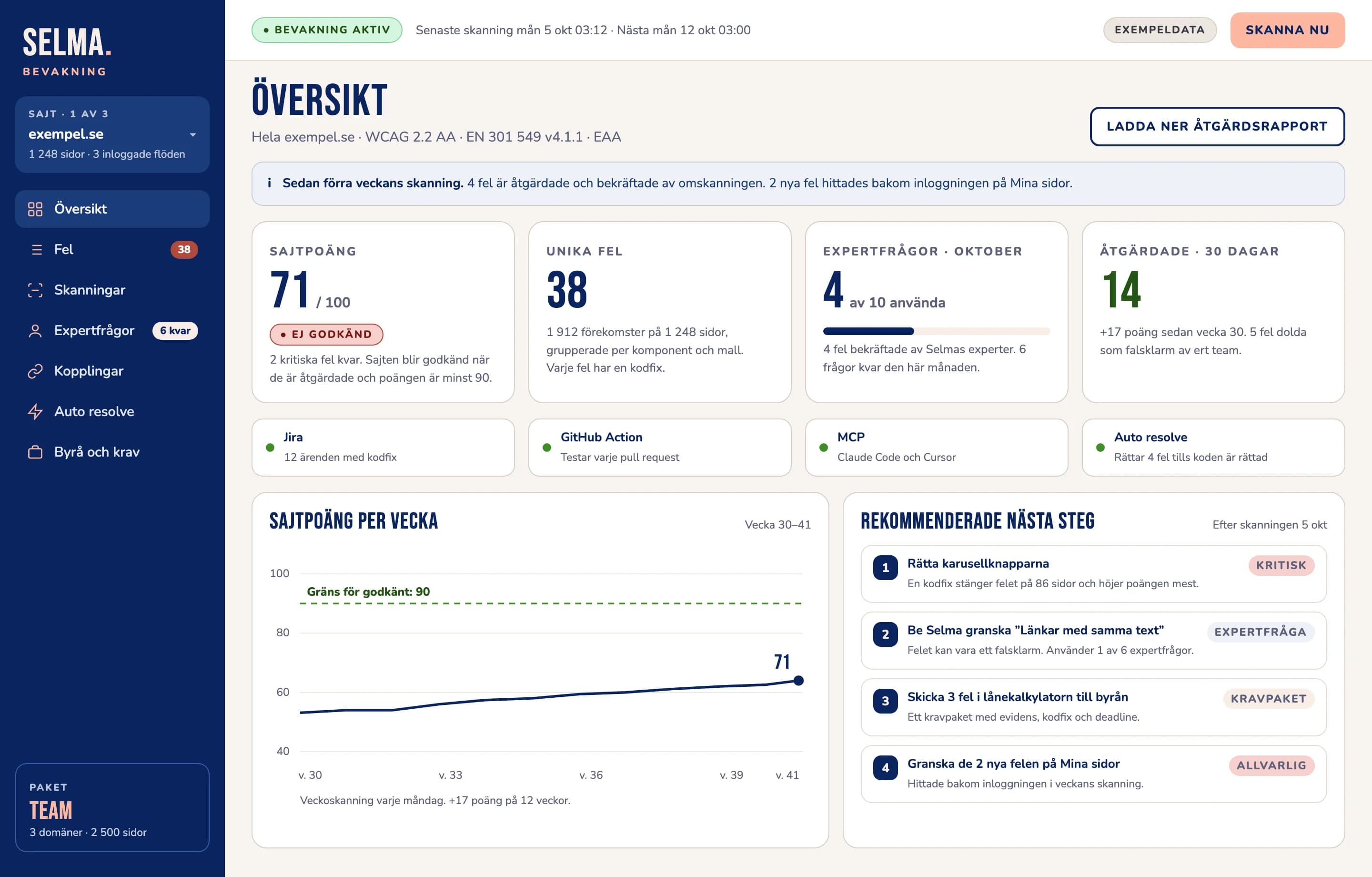
The overview brings the whole domain together in one view: a score for the site, how it has developed, what to deal with first and which connections are active.

  • The score is weighted by severity. As long as one critical issue is left, the site is never approved.
  • Recommended next steps show which fixes have the most effect.
  • The week-by-week curve shows that the work is paying off.
The overview in Selma Bevakning for exempel.se on the Team plan: a site score of 71 out of 100, not approved with two critical issues left, 38 unique issues, 4 of 10 expert questions used, active connections to Jira, GitHub Action, MCP and Auto resolve, a curve of the score week by week and four recommended next steps.
The overview for one domain on the Team plan. Example data. View the picture at full size (opens in a new tab)

Issues

You can see which issues are verified

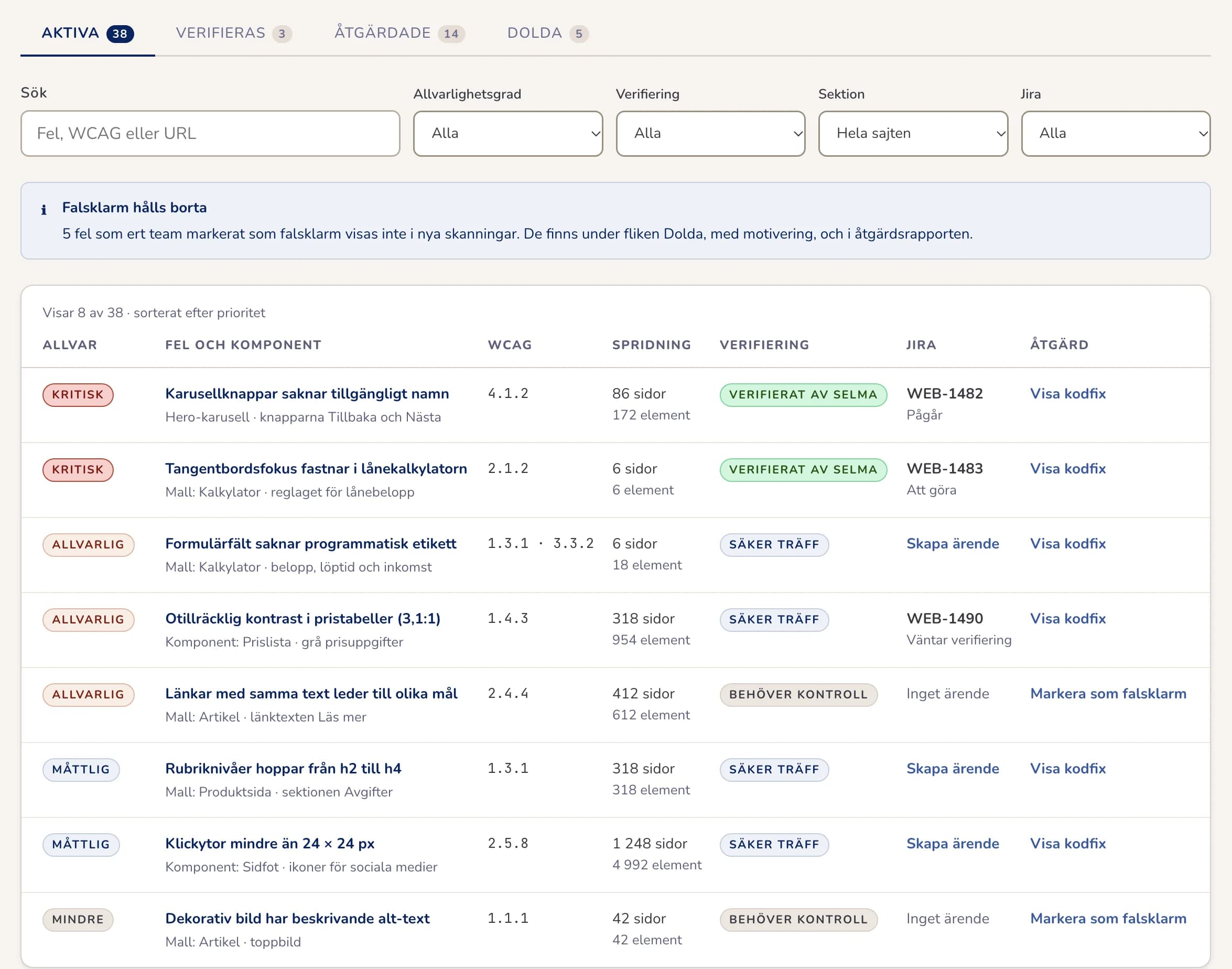
Issues that Selma's experts have reviewed are marked Verified by Selma, so developers know an issue is real before they spend time on it.

  • Ask Selma to review an issue you are unsure about. Team includes ten questions a month.
  • Issues are grouped by component and template, so the same issue does not show up a hundred times.
  • Filter by severity, section and WCAG rule.
The issue list with eight issues grouped by component and template. Each row shows the severity, the WCAG criterion, the number of pages, the confidence level and the status in Jira.
The issue list, grouped by component and template. Example data. View the picture at full size (opens in a new tab)

False positives

A false positive is marked once

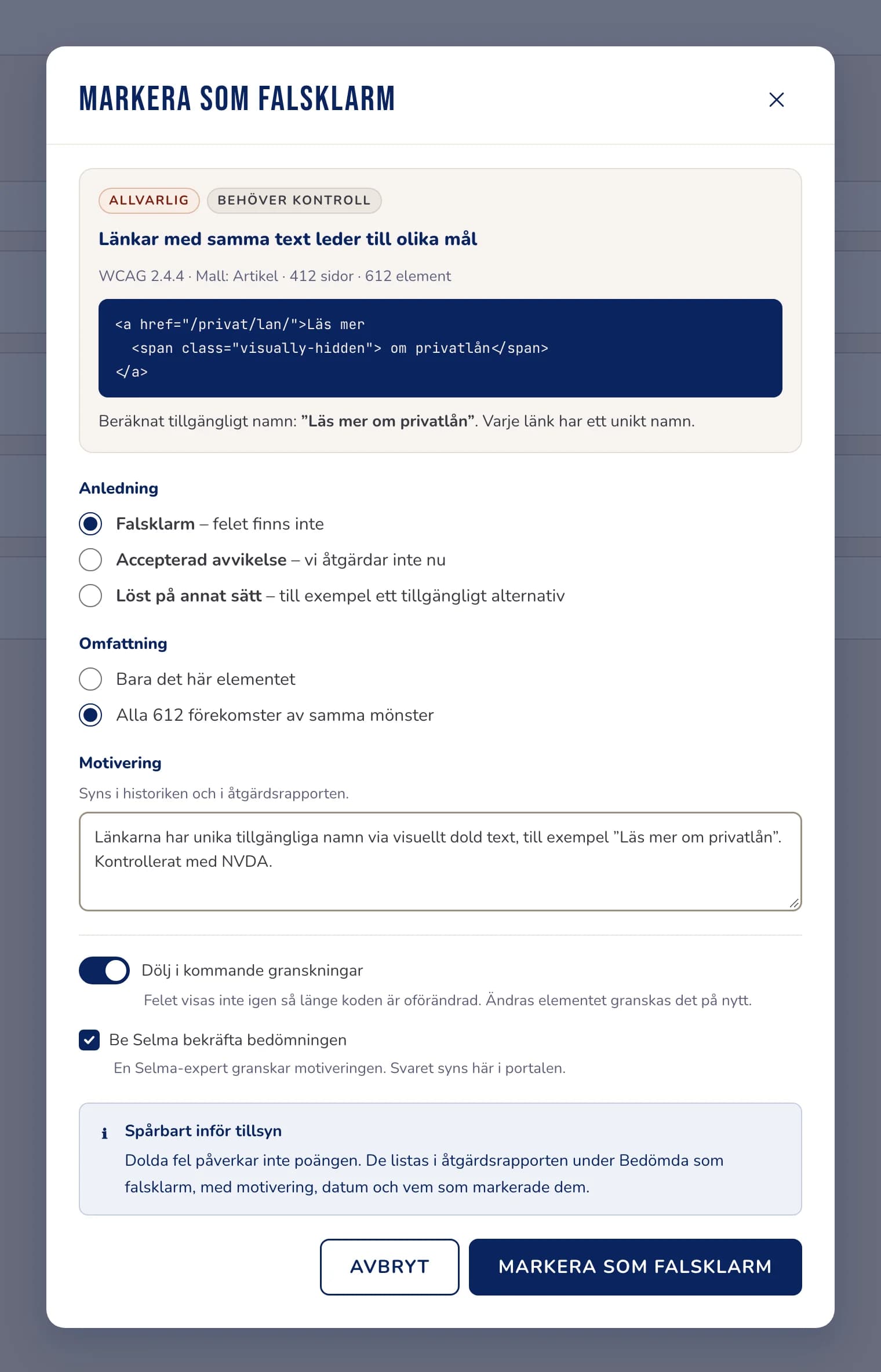
If an issue is not a real issue, you mark it with a reason. The assessment is saved, and the issue does not show up in later reviews as long as the code stays the same.

  • Choose a reason, and whether the assessment covers one element or every occurrence.
  • Ask a Selma expert to confirm the assessment.
  • Hidden issues stay in the remediation report, with the reason and the date.
The dialog for marking a false positive, with a reason, a scope, an explanation and the choice to hide the issue in later reviews.
The dialog for marking a false positive. Example data. View the picture at full size (opens in a new tab)

For developers

Evidence your developers can use straight away

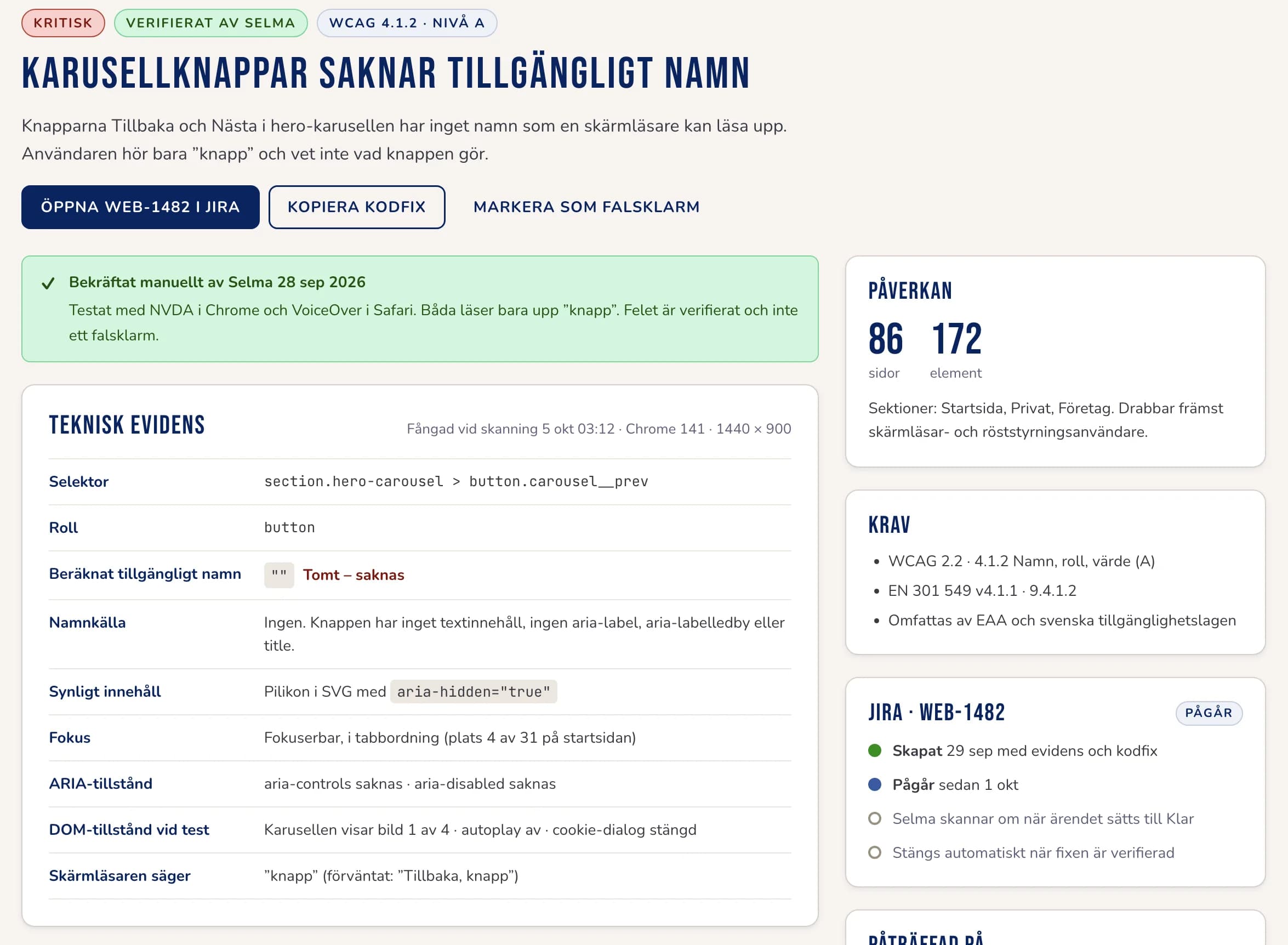
Every issue comes with the technical evidence needed to understand and fix it, without the developer having to reproduce it first.

  • Selector, role and computed accessible name.
  • ARIA states, the DOM state during the test and what the screen reader reads out.
  • A code fix to put into the source code.
A critical issue, carousel buttons with no accessible name, with technical evidence: selector, role, computed accessible name, name source, focus, ARIA states and what the screen reader says.
An issue with technical evidence. Example data. View the picture at full size (opens in a new tab)

Agency

Give your agency clear requirements

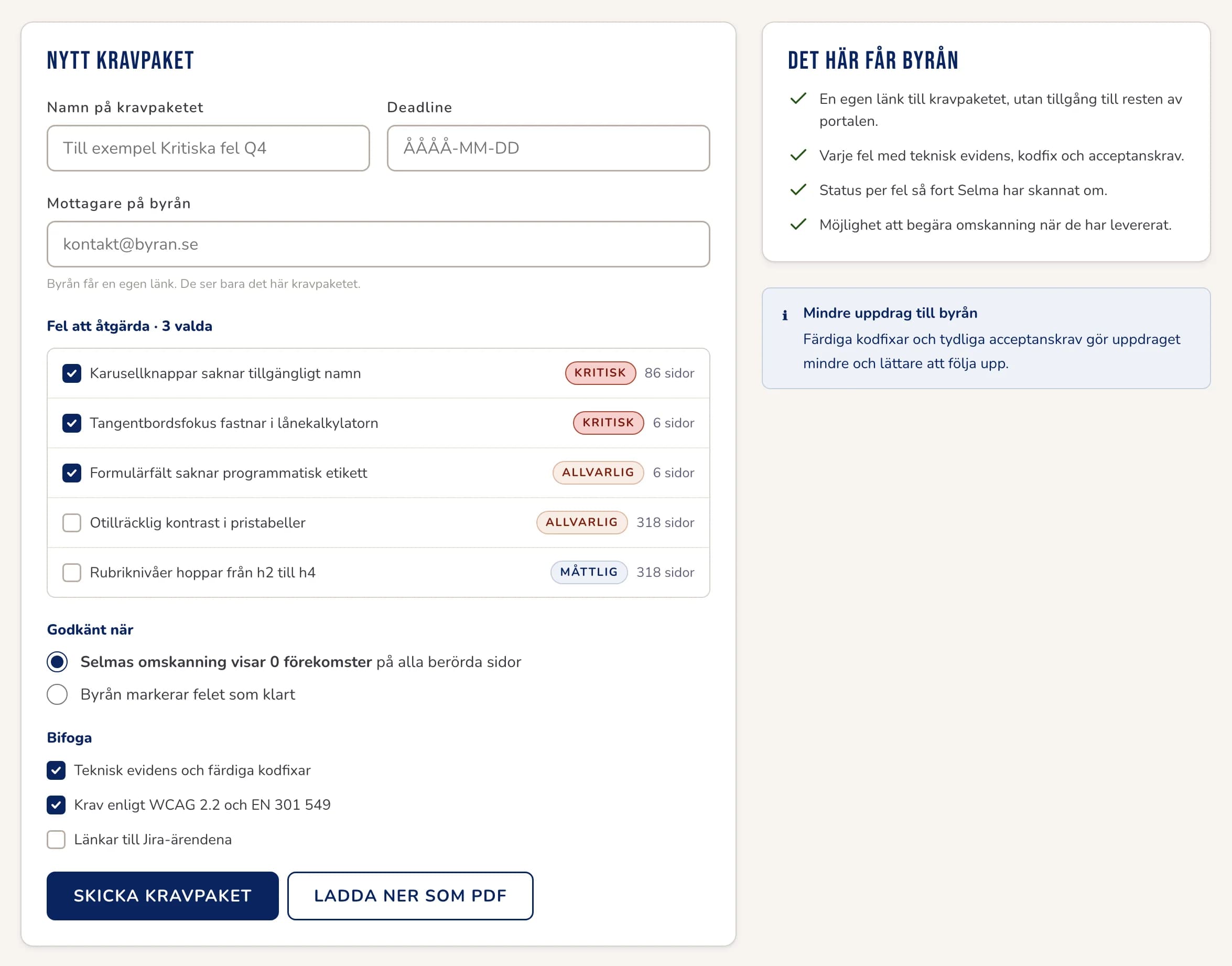
Put the issues in a requirements package with a deadline and send it to your web agency. The agency gets its own link with the evidence, the code fixes and what counts as done.

  • The agency only sees the requirements package, not the rest of the tool.
  • An issue only counts as done once Selma's new scan confirms it.
  • You follow the delivery issue by issue.
A form for a new requirements package for a web agency, with the recipient, a deadline, the chosen issues and what it takes for an issue to count as done.
A requirements package for a web agency. Example data. View the picture at full size (opens in a new tab)

Example

What an issue looks like for a developer

This is the issue from the picture under For developers, now as text. This is how much evidence the developer gets for every issue.

CriticalVerified by SelmaWCAG 4.1.2 Name, Role, Value

Carousel buttons have no accessible name

The Back and Next buttons in the carousel have no name a screen reader can read out.

Technical evidence

Selector
section.hero-carousel > button.carousel__prev
Role
button
Computed accessible name
Empty – the button has no name
The screen reader says
“button” (expected: “Back, button”)
Found on
86 pages, 172 elements

Code fix

- <button class="carousel__prev" type="button">
+ <button class="carousel__prev" type="button"
+   aria-label="Back" aria-controls="hero-slides">
- <button class="carousel__next" type="button">
+ <button class="carousel__next" type="button"
+   aria-label="Next" aria-controls="hero-slides">

The buttons get the names “Back” and “Next”. Because the carousel is a shared component, the same change closes the issue on all 86 pages.


For developers

Connected to developers' tools

In Team and Agency, issues end up where developers already work, and more of the site can be reviewed.

  • Tickets in your system

    Create tickets in Jira, Asana, Notion or Linear with the technical evidence and code fix filled in.

  • Tests before release

    With CI and a GitHub Action, every change is tested before it goes live, and developers only see the new issues.

  • MCP for AI editors

    Connect Claude Code, Cursor or GitHub Copilot to Selma. The AI assistant fetches the issues and suggests the fix in the right file.

  • Auto resolve

    With a script from Selma, some issues are fixed in the visitor's browser as the page loads, until they are fixed in the source code. The issues stay on the fix list, so nothing is forgotten.

  • Pages behind a login

    Selma signs in with a test account in your test environment and reviews the flows behind the login. No real customer data is used.

  • Recommended next steps

    After every scan, the tool suggests what to deal with first.

Plans

Three plans for the whole site

Every plan reviews the whole domain. The difference is how many domains and pages are included, and how much help you get to fix the issues. Each plan includes everything in the one before.

  1. Start

    1 domain, up to 500 pages

    For a website that should be reviewed and followed up every week.

    • Weekly scan of the whole domain and scans on demand
    • Score weighted by severity
    • Issues by component and template
    • Technical evidence and a code fix per issue
    • Reports and export
    • Accessibility statement and a supervision mode for the private or public sector
    • Inventory of the site's PDFs
    • Plain Swedish and LIX readability
  2. Team

    Up to 3 domains and 2,500 pages

    For teams that fix issues with their own developers or an agency.

    • Everything in Start
    • Mark false positives
    • Expert-verified issues, ten questions a month
    • Requirement packages for your agency
    • Tickets in Jira, Asana, Notion and Linear
    • CI and GitHub Action
    • MCP for AI editors
    • Pages behind a login
    • Recommended next steps
    • Auto resolve
  3. Agency

    Up to 15 domains and 10,000 pages

    For agencies that look after many clients' websites.

    • Everything in Team
    • Agency view of all clients' websites
    • Reports under the agency's own brand

The price depends on the plan you choose and how many domains and pages you want to monitor. Book a demo and we will go through what suits you.

Manual expert reviews and PDF remediation can be added to any plan. Read about our services

Book a demo

Frequently asked questions

How is it different from Selma Scanning?
Selma Scanning tests one page at a time and gives a snapshot. Selma Bevakning reviews the whole domain every week, follows issues over time and gives developers evidence and a code fix for every issue.
How are false positives handled?
You can mark an issue as a false positive yourselves, with a reason, and it will not show up in later reviews as long as the code is unchanged. If you are unsure, a Selma expert can review the issue.
Can you review pages behind a login?
Yes, in Team and Agency. You give us a test account in your test environment, and Selma reviews the flows behind the login. No real customer data is used.
Does it work with our ticket system?
Yes, in Team and Agency. Selma connects to Jira, Asana, Notion and Linear, and tickets are created with the technical evidence and code fix filled in.
Does the tool make the site meet the law?
No, no automated tool can show that on its own. The monitoring finds and follows up issues and documents the work for you. An answer about the legal requirements takes a manual review.
What does it cost?
The price depends on the plan you choose and how many domains and pages you want to monitor. Book a demo and we will go through what suits you.

Want to see the tool in practice?

Book a demo and we will go through the monitoring and how it fits the way you work.

Book a demo